

Part of the series: What It Takes to Build Production-Grade Voice AI Agents
TL;DR: Voice agent observability requires three distinct data layers – real-time per-turn metrics for latency debugging, call lifecycle tracking for operational dashboards, and post-call AI analysis for business intelligence. We built all three on top of our real-time communication framework, with a lightweight analytics service feeding dashboards and CRM. Key lessons: analytics failures must never interrupt a live call, cost tracking doubles as anomaly detection, and the pricing audit trail saved us weeks when we migrated between models.
If you're evaluating voice AI, here's a question that often gets deferred:
how will you know what's actually happening on your calls?
You need to see inside conversations, not just infrastructure. A 200 OK from your health check tells you nothing about whether the agent just misunderstood a complaint as a goodbye intent and hung up on a frustrated customer. Voice agent observability is a fundamentally different problem from traditional APM.
We learned this across thousands of production calls – outbound campaigns in Hindi and Hinglish using a real-time communication framework for orchestration, streaming STT providers for transcription, a mini-tier LLM for reasoning, and a neural TTS engine for speech synthesis. This post covers the analytics architecture we built and the decisions behind it.
Three Layers of Data
Voice agent analytics isn't one problem. It's three distinct problems that happen to share a call ID.
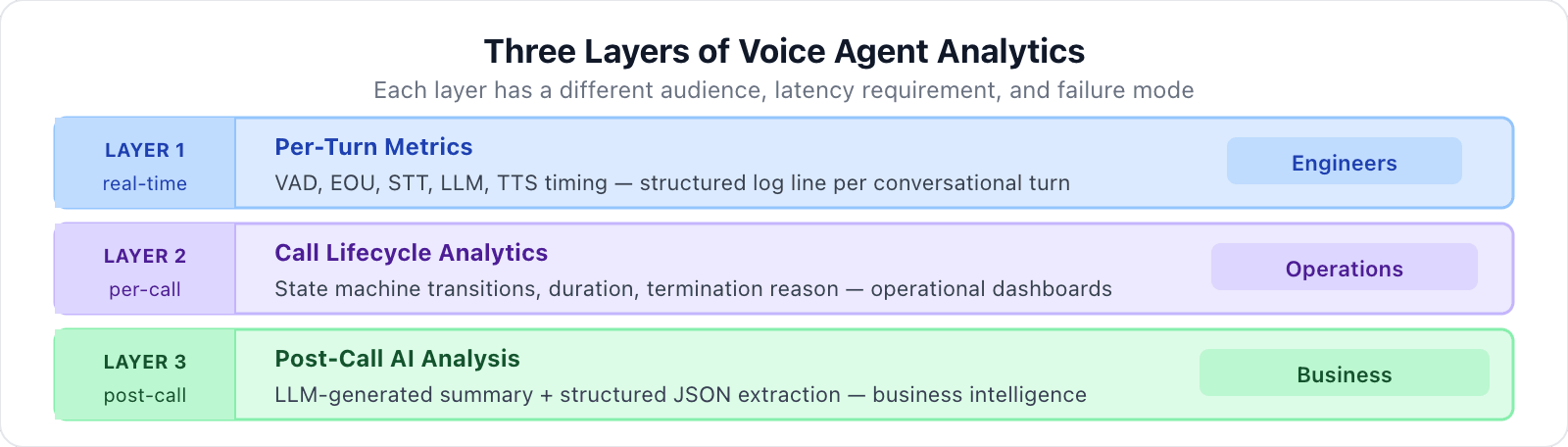
Layer 1: Real-time turn metrics (for engineers). During the call, every conversational turn generates timing data – how long did VAD take? How fast was the transcription? What was the LLM's time-to-first-token? This data lives in structured log lines and is essential for latency debugging.
Layer 2: Call lifecycle analytics (for operations). Each call progresses through a state machine – initiated, in_progress, completed, failed – with timestamps, duration, and termination reason. This tells you how many calls connected, how many failed because the customer was busy, and how many ended because the customer hung up versus the agent completing its script.
Layer 3: Post-call AI analysis (for the business). After the call ends, an LLM reads the full transcript and produces two outputs: a structured JSON extraction (call outcome, customer tone, key topics, intent signals) and a narrative summary. This turns raw conversations into a data product that operations teams can act on.
Each layer has different latency requirements, different storage patterns, and different failure modes. Conflating them is how analytics systems become unreliable.
The Call Lifecycle State Machine
Every call follows a deterministic state progression:
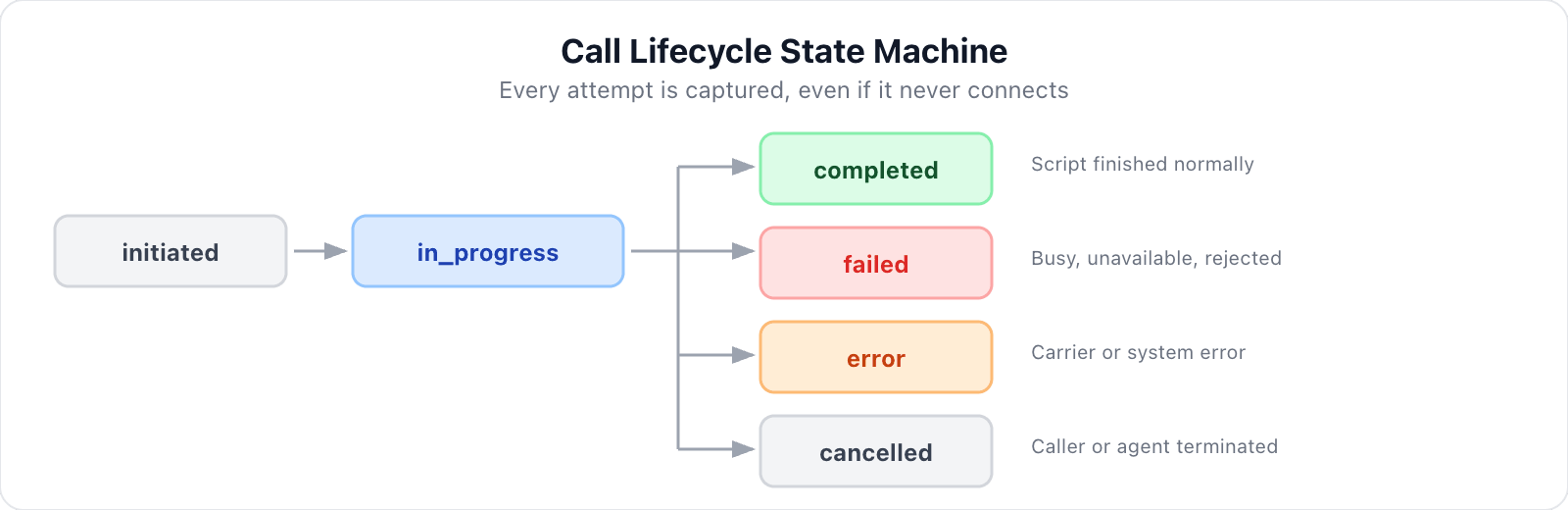
For outbound calling campaigns, this state machine is load-bearing. We create the call record before the SIP dial attempt is in initiated status. Even if the telephony layer fails entirely – SIP 480, 486, 503, or a gateway timeout – we have a record of the attempt.
When a call connects, the record transitions to in_progress the moment the participant joins. When the session closes, we map the close reason to a final status and a human-readable termination value – customer_hangup, agent_hangup, completed, system_shutdown, error – because downstream consumers (dashboards, CRM sync) need to distinguish between a customer who said goodbye and a system that crashed.
SIP failures get their own treatment. We maintain a mapping of nearly 20 SIP status codes to call states – for example, 486 maps to failed/busy, 487 to cancelled/request_terminated, 503 to error/service_unavailable – We will cover the full mapping in our next post on production failures.
This might seem like over-engineering until you're looking at a campaign of 500 calls and need to answer "how many failed because the customer was busy versus how many failed because the carrier had an outage?".
One design constraint worth noting: SIP failure status updates must be synchronous, not fire-and-forget. In event-driven systems, multiple handlers can fire in rapid succession when a call fails – and if status updates run asynchronously, the order they complete is non-deterministic. Final call status needs explicit ordering guarantees to ensure your dashboards reflect the actual failure reason, not a generic close status.
Per-Turn Metrics: Seeing Inside the Conversation
The most operationally useful piece of observability in the entire system is the per-turn metrics aggregator. It tracks timing for every conversational turn – the cycle from user speech to agent response – and emits a single structured log line when each turn completes.
A production turn log line:
turn[a3f2c8d1] latencies: VAD=12ms, EOU(eos/trans)=340ms/38ms, STT=38ms,
  LLM=892ms (TTFT=240ms), TTS=1340ms (TTFB=180ms)
Each metric tells you something specific:
VAD (12ms): Voice Activity Detection inference time. Runs locally on the agent host. If this climbs, you have a compute problem.
EOU (340ms/38ms): End-of-utterance detection. The first number is how long after the user stopped speaking before the system decided the utterance was complete. The second is transcription delay. This is where turn detection tuning lives.
STT (38ms): For streaming STT (our default), this can show as - because transcription happens incrementally. For non-streaming recognitions, it shows request duration.
LLM (892ms, TTFT 240ms): Total wall-clock time and time-to-first-token. The aggregator handles multi-step LLM calls (function calls requiring additional rounds) by tracking the wall-clock span across all steps.
TTS (1340ms, TTFB 180ms): Total synthesis duration and time-to-first-byte. The aggregator tracks spans across multiple TTS segments per turn.
Metrics are automatically scoped to conversational turns without manual boundary detection – the aggregator's lifecycle is tied to the framework's internal representation of each turn.
Two rules of thumb from thousands of production turns:
- Turn Latency: if total turn latency (EOU + LLM TTFT + TTS TTFB) regularly exceeds 1.5 seconds, users start speaking over the agent. Interruption handling becomes the bottleneck, not latency itself.
- LLM Latency: Watch for LLM duration spikes without corresponding TTFT increases. That indicates the model is generating long responses (high token count), not that inference is slow. The fix is prompt engineering, not infrastructure.
Transcript Capture
Transcript capture uses two distinct event sources. User speech comes from the transcription event handler: only the final transcripts, filtering out the stream of interim results that arrive during active speech. Agent speech comes from the conversation event stream: only assistant-role messages, skipping function calls and system messages.
Each segment carries a UUID, a UTC timestamp, and a speaker label. Downstream consumers get a clean, ordered transcript with attribution – essential for post-call analysis, compliance review, and the regression testing pipeline described in the testing deep dive.
One critical constraint: analytics communication must be fully isolated from the live call.
A failed transcript write that throws an unhandled exception will drop an active call – and in voice, unlike web services, you can't retry. The conversation is gone.
We treat all analytics writes as non-critical operations that cannot propagate failures back to the agent. The one time our analytics database went down during a campaign, calls continued normally and transcripts from that window were simply missing – an acceptable trade-off versus dropping live calls.
Post-Call AI Analysis: Dual-Layer Intelligence
When a call ends, we feed the full transcript to a cost-efficient LLM and produce two distinct outputs:
Layer 1: Narrative summary. A structured markdown document – key details, customer sentiment, recovery assessment, strategic insights. This is what a human reads when reviewing a call.
Layer 2: Structured JSON extraction. Enumerated fields extracted into a strict schema. Common fields include call outcome (lead captured, feedback collected, terminated early, no engagement), customer tone (positive, neutral, frustrated, cooperative, dismissive), and domain-specific intent signals.
The structured layer is what dashboards and CRM integrations consume. When a stakeholder asks "what percentage of customers mentioned a specific concern as their primary objection," the answer comes from aggregating a field across calls – not re-reading summaries.
Why both? The structured extraction loses context that the narrative preserves. A "frustrated" tone enum tells you the customer was unhappy; the narrative tells you they were frustrated specifically because of a service failure at their local dealer. Both are necessary.
Agent-specific analysis configs handle different use cases. Different campaign types need completely different extraction schemas – a feedback campaign cares about competitive intelligence, while a service reminder campaign cares about scheduling preferences. The configuration is selected at analysis time based on the agent identifier – adding a new agent type requires no changes to the analytics service, just a new config entry.
Analysis costs are tracked separately from conversation costs. The cost record distinguishes between tokens used during the live call and tokens used for post-call analysis – typically $0.002-0.005 per call for analysis.
Cost Tracking as Observability
Cost tracking in a voice agent isn't only a billing feature – it's also an observability feature. When per-call cost jumps from $0.018 to $0.045, something changed in the conversation dynamics.
Cost anomalies are often the first signal of a behavioral regression.
Our cost system uses a centralized pricing registry mapping model identifiers to per-unit pricing for each component. At call end, automatic usage collection hooks from the framework provide aggregated token counts, audio durations, and character counts:
Cost Summary:
  LLM Input: $0.006 (39K tokens)
  LLM Output: $0.000 (207 tokens)
  LLM Cached: $0.002 (26K tokens)
  STT: $0.005 (66s audio)
  TTS: $0.005 (544 chars, 28s audio)
  TOTAL: $0.018
The critical design decision: the pricing audit trail.
Each cost record stores not just calculated costs, but the model identifiers and exact pricing rates. When we migrated between LLM versions, we could immediately distinguish "costs went up because the model is more expensive" from "costs went up because conversations got longer."
When an unknown model is detected at runtime, the pricing lookup falls back to defaults and logs a loud error. Cost tracking never breaks the agent, but someone always notices and updates the registry.
The Recording Pipeline as a Data Source
Call recordings are the ground truth that validates everything else. When a transcript looks wrong, you listen. When structured extraction misclassifies tone, you listen.
Recordings aren't archival – they're the audit log for an AI system making judgment calls.
We use our real-time framework's built-in recording service – it captures all participant audio with perfect timing, since the platform handles mixing natively.
The flow:
- Recording starts immediately when the agent joins – before the caller connects, ensuring we never miss the first seconds.
- The service encodes to MP4 (audio-only) and uploads directly to S3-compatible storage.
- Call ends. The agent stops recording and registers the recording with the analytics service.
The analytics API surfaces recordings alongside transcripts and analysis, so downstream consumers (dashboards, call review tools) get everything they need in a single request.
Key Takeaways
What worked well:
The three-layer approach gives the right data to the right audience. Engineers look at turn metrics. Operations looks at lifecycle data. Business stakeholders look at post-call analysis. Nobody wades through the wrong abstraction level.
Storing pricing metadata alongside costs has been invaluable. When we switched STT providers, we could immediately compare cost profiles without back-calculating from raw usage.
Agent-specific analysis configs let us reuse the entire analytics infrastructure for different campaign types with zero code changes to the analytics service.
What we'd do differently:
Transcript correction earlier. Raw STT output for Hindi-English code-switching had errors that propagate into both the narrative summary and the structured extraction. A post-processing step between transcription and analysis – even something as simple as a lightweight correction pass – would have improved downstream data quality significantly. By the time we addressed this, we'd already generated thousands of analyses on uncorrected transcripts.
Cost anomaly alerting from the start. Cost data turned out to be a surprisingly effective leading indicator for behavioral regressions – unusually high token counts often meant the agent was stuck in a loop or generating overly verbose responses. We caught these by manually reviewing cost logs during campaigns; automated alerting on per-call cost thresholds would have caught them faster and without someone having to be watching.
Voice agent analytics isn't a feature you bolt on after the agent works. It's a parallel workstream that shapes how you understand, debug, and improve the system.
The right analytics architecture turns a black-box voice agent into something you can reason about – call by call, turn by turn, and dollar by dollar.
This post is part of our series on building production-grade voice AI agents. Read the other deep dives: Latency Tuning, Cost Optimization, Prompt Engineering for Voice, Testing Strategies, and Production Hardening.
Need visibility into your voice agent's performance? Let's architect your observability stack - We can help you design an analytics architecture that gives engineers, operations, and business stakeholders exactly the data they need – including per-turn latency instrumentation, cost tracking with audit trails, and post-call AI analysis pipelines.